

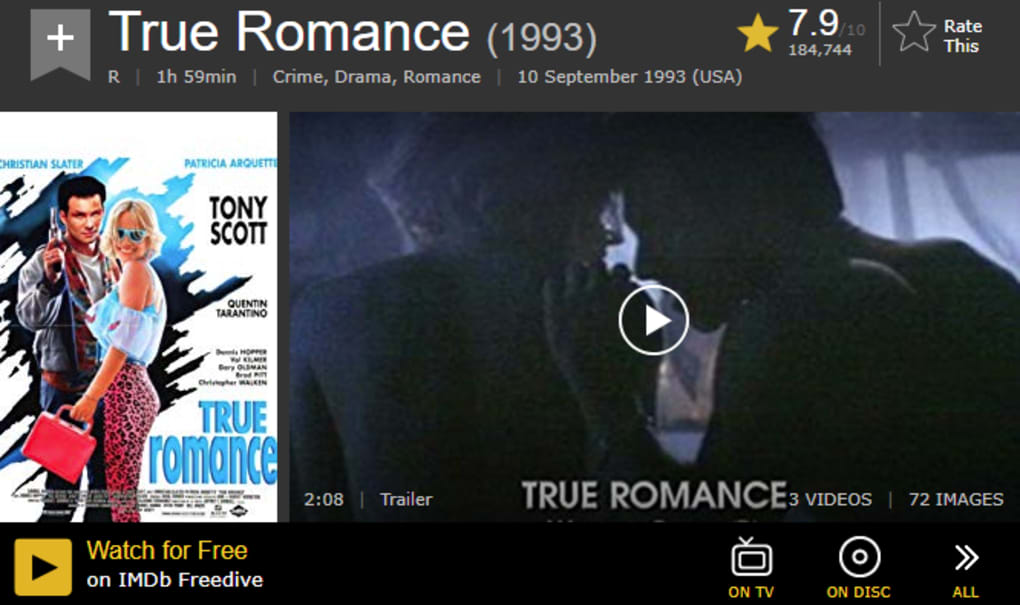

Download Freedive – Free, Secure Movie & TV Streaming App
Overview
Freedive is the newest web‑app from IMDb, the world’s most trusted movie and TV database. Unlike a traditional catalog, Freedive turns IMDb’s massive repository of titles into a full‑blown streaming platform that lets you watch movies, series, documentaries and even exclusive original productions – all for free. The service lives entirely in the cloud, so there’s no need to install bulky client software; a modern browser is all you need to start binge‑watching.
What sets Freedive apart from other free streaming sites is the combination of IMDb’s authoritative metadata and a seamless, ad‑light viewing experience. Each title comes with a concise synopsis, cast list, language options, rating and even an embedded trailer, helping you decide instantly whether a film is worth your time. The interface groups content by genre, theme, release decade and popularity, making discovery as easy as a few clicks.
Because the library is built on IMDb’s ever‑growing database, Freedive constantly adds new releases while preserving classic titles that might disappear from other platforms. Whether you’re hunting for the latest blockbuster, a cult classic, or an original series you can’t find elsewhere, Freedive promises high‑quality, fast streaming without the hassle of subscription fees or time‑limited rentals. In short, Freedive delivers a Netflix‑style experience powered by the most comprehensive film knowledge base on the planet, giving you freedom to explore, watch, and enjoy entertainment on your own schedule.
Core Features
- Massive Catalog: Access millions of movies, TV episodes, documentaries and IMDb‑original productions in one place.
- Free & Secure Streaming: No hidden subscription fees; SSL encryption protects your connection.
- Instant Playback: Low‑latency streaming with minimal buffering, even on slower broadband.
- High‑Definition Options: Streams available up to 1080p HD, automatically adjusting to your bandwidth.
- Rich Metadata: Detailed synopses, cast & crew lists, language tracks, parental ratings and user reviews for every title.
- Trailers & Previews: Watch official trailers before committing to a full‑length film.
- Personal Watchlist: Save titles for later, organize by genre or personal rating, and sync across devices.
- Smart Recommendations: AI‑driven suggestions based on your viewing history and IMDb preferences.
- Original Content: Exclusive Freedive originals ranging from short films to full‑season series.
- Multi‑Device Compatibility: Works on any modern browser, plus dedicated apps for Windows, macOS, Android and iOS.
Getting Started, Installation & Compatibility
How to Install Freedive
Freedive is primarily a web‑app, which means you can start streaming instantly from any browser without downloading an installer. For users who prefer a native experience, Freedive offers lightweight desktop clients for Windows 10/11 and macOS 12+, as well as mobile apps for Android 8.0+ and iOS 13+. The installation process is straightforward:
- Visit freedive.imdb.com and click the “Download” button for your platform.
- Run the installer (Windows EXE or macOS DMG) and follow the on‑screen prompts – the installer automatically adds Freedive to your start menu or Applications folder.
- Launch the app, sign in with your IMDb account (or create a free account in seconds), and you’re ready to stream.
- For mobile devices, open the App Store or Google Play, search “Freedive IMDb”, tap “Install”, and log in.
First‑Time Usage Tips
Upon first login, Freedive will ask you to set up a watchlist and choose your preferred genres. This quick onboarding step helps the recommendation engine curate a personalized homepage. The main navigation bar features tabs for Home, Movies, Series, Originals, and My List.
Use the search bar at the top to find specific titles; autocomplete suggestions include both popular releases and hidden gems. When you select a title, you’ll see a detail page with the synopsis, cast, rating, and a “Play” button. Click “Play” to launch the built‑in video player, which offers standard controls (play/pause, volume, subtitles, picture‑in‑picture).
Subtitles are available in multiple languages for most titles – simply click the “CC” icon to choose your preferred language.
Device Compatibility Windows, macOS, Android, iOS, Linux (via browser)
Because Freedive runs in any modern browser (Chrome, Edge, Firefox, Safari), it is fully compatible with desktop operating systems such as Windows 10/11, macOS 12+, and most Linux distributions. The native apps are optimized for the latest OS releases, ensuring smooth playback and low CPU usage. Mobile users will appreciate the adaptive bitrate streaming that automatically selects the best quality based on cellular or Wi‑Fi connectivity. Freedive also supports Chromecast and AirPlay, allowing you to cast the video to a TV for a big‑screen experience.
Pros, Cons, Frequently Asked Questions & Conclusion
Pros
- Completely free with no hidden subscription costs.
- Vast library powered by IMDb’s authoritative database.
- High‑quality streaming with minimal buffering.
- Rich metadata and trailer previews for informed choices.
- Cross‑platform support (web, desktop, mobile, TV casting).
- Personal watchlist and AI‑driven recommendations.
- Original Freedive content not found elsewhere.
- Secure HTTPS connection protects user privacy.
Cons
- Ad‑supported free model may include occasional non‑intrusive ads.
- Some newly released blockbusters may be delayed due to licensing.
- Limited offline download capability (currently web‑only streaming).
- Requires a stable internet connection for HD playback.
- Regional restrictions may affect availability of certain titles.
Frequently Asked Questions
Is Freedive really free or are there hidden fees?
Freedive is completely free to use. The platform is ad‑supported, but there are no subscription fees, pay‑per‑view charges, or hidden costs. All premium‑grade features, including HD streaming and the full catalog, are available at no charge.
Do I need an IMDb account to watch movies on Freedive?
Yes, an IMDb account is required for login. Creating an account is free and takes less than a minute. Once logged in, your watchlist and preferences sync across all devices.
Can I download movies for offline viewing?
At present, Freedive focuses on streaming only. Offline download functionality is under development and may be added in future updates.
What video quality does Freedive support?
Freedive streams up to 1080p Full HD. The player automatically adjusts the bitrate based on your internet speed to prevent buffering.
Is there a way to block ads on Freedive?
Since Freedive’s free model relies on non‑intrusive ads, there is no built‑in ad‑blocker. However, you can use a reputable browser ad‑blocking extension if you prefer an ad‑free experience.
Conclusion & Call to Action
Freedive represents a bold step forward in the free‑streaming space, leveraging IMDb’s unrivaled movie database to give users an expansive, secure, and user‑friendly entertainment hub. The combination of a massive catalog, high‑definition streaming, and powerful recommendation tools makes it a compelling alternative to paid services, especially for viewers who value variety and discoverability without a recurring fee. While occasional ads and the lack of offline downloads are minor drawbacks, they are outweighed by the sheer amount of content available and the seamless cross‑device experience. If you’re looking for a free, legal way to binge‑watch both classic cinema and fresh releases, Freedive is ready to deliver. Download Freedive today, sign in with your IMDb account, and start exploring an endless library of movies and series—your next favorite title is just a click away.



.png)



